Showing posts with label Tips seo. Show all posts

Wednesday, October 22, 2014

How to Perform SEO On Page Optimization Google With Properly


Onpage SEO is an attempt to organize a web page to a search engine such as Google can recognize key words are what we emphasize on the page. Do not let the page we discuss about how to fix a computer, but instead indexed to keywords lottery or other gambling.

Google and other search engines set of words that frequently appear on the page as a discussion of the theme of the page. So if you are one of arranging the homepage, then you may fail to tell Google the keywords you target.

So if you want to know how to do a proper onpage SEO you must meet all or at least most of the points below. It should be noted that what is below are common to all kinds of web pages, be it a blog or website. So depending on whether you are able to edit your own website / blog to comply with the standards below.

title tags
Title tags are the most important components that you should consider when doing onpage optimization. The title tag in the <head> of pages and enclosed with the <title>. So these are the things you need to consider:


  • Make sure the keywords you are targeting can be found in the title of this tag.  
  • Increasingly in the front position of the keyword, the better; so do not put your brand in front of the title tag 
  •   Title tag length should be limited to 5-7 words 
  •  The title should be made provocative enough to provoke the beholder to click
meta description
To do SEO on page, then the meta description should also receive special attention. So these are the things you need to consider from a meta description.

  •  Make sure you put the key word in the beginning of the meta description. 
  •  Make sure you quote additional keyword variations or complementary; opportunities to add keyword variations that you can master 
  •  Do not repeat a word more than 2 times in the meta description 
  •  The length should be limited to 150 characters. 
  •    Wherever possible meta description is also made to invite click the read
 Heading system
What is meant by the heading system is the use of the <h1> to <h6> in the article. Although the tags available to <h6> but in common practice to use only the <h3> or <h4> alone.

<H1> signifies very important; <h2> denotes important; and <h3> is quite important. This heading tag is usually used as the title of the discussion points in the article. If you ever make a thesis in college, then you must know what is meant by the points of discussion.

Applications use heading tags are good systems can be found in all the articles in Wikipedia. Heading tags are very important so you should ensure that your keywords in the headings contained in these to support your onpage SEO optimization.


 The use of bold
Although today the role of the weak only bold but it still gives points so you should print thick targeted keywords in the article. It also can help you perform onpage SEO on the page.


 The use of ALT tags on images
If you use the image in the article then you should include the ALT tag in it. Why? Because this time googlebot and other robots can not recognize the image. So the classification of images is done simply by reviewing the ALT tag is used.


 Interlink system
If your website was discussed too many diverse issues, it stands to reason that one page and the other will mutually irrelevant. Increase the link on the sidebar to the article so others can weaken the relevance of the article will be displayed.

For example: If you discuss health issues; but there are many links in the sidebar to the article financial problems; or automotive, etc; the relevance of the page to health will be reduced.

Make sure you are strong enough to find backlinks if you want to reproduce irrelevant links on the sidebar. From here you can see that the way you do onpage SEO optimization will determine how hard you will Offpage SEO optimization.


 Text Sitewide should be minimized
What is meant by sitewide text is the text that appears on all pages in your blog. For example, the text that is in the sidebar and in the footer text. If you are not strong write long articles, then you should limit the static content in the sidebar and footer.

I never found the person who was just able to write 400-500 words per article, but in the sidebar and footer there is a very long text, which can add up to touch 2000 words.

This also applies to the comments field. If your comment column just long fishing spam comments but are not relevant to the material you are discussing, then closed his comments column should be for the good of your onpage SEO optimization.


 Be careful with links out
Nofollow links out although it will still drain points out of your yard. So make sure to do not put out the link if it is not really necessary.


 Responsive Design Era
Looks like Google is more like a mobile friendly website. So if it can be strongly recommended to use a template that is responsive from the beginning, because if the traffic is already high will be a bit troublesome to do so. This blog template I made responsive yet because it is still calculating how to anticipate recalculation when changing the template.

If you can do bullet points above correctly, then it seems it is very adequate. You do not need to mess around with onpage analyzer tools that say 70% or 80% or even 100% .... There is no standard rules like that .... There are a lot of websites with onpage below 70% beat the 100% in Google search results page.
Ok, good luck doing your onpage SEO optimization.

Friday, October 10, 2014

how to use Google Analytic


How do I use Google Analytic? Google Analytic is one of the tools that can give you excellent access to see the activity on your blog. The problem is a lot of bloggers who do not know how to use it. So this time I will explain about the benefits of Google Analytic.

I assume you already have a Google Analytic account. If not then do not need to read this article further. Please read the first article how to sign up for Google Analytic. Meanwhile, for those of you who already have an account let's get started. My discussion will be divided into 2 main points:

1. How do I use Google Analytic to observe visitor Character? 
2. How do I use Google Analytic Performance Articles to observe?

# 1 How do I use Google Analytic visitors to observe the character? 

  •  Please login and you will be entered into the Google Analytic Account of your Home. Click the blog account you want to observe its activity.
  •  There will be a dropdown that gave rise to the name of an account, please click once again.
  •  You will be brought into your blog page, at the Visitors Overview session. On this page you can see a large graph showing the rate of visitors to your blog from day to day.
  •  If you are just learning SEO, then do not panic with the curves up and down, because it's natural. It happens up and down every week. Usually traffic peaks on Tuesday and Wednesday, and the lowest traffic in a week on Saturday and Sunday .... so just relax. 
  •  Further down there will be a report how many people have visited your blog since code tracker installed, and underneath there is a detailed explanation of this amount.
  1.  VISITS is an explanation of how all visits
  2.  UNIQUE VISITORS is without taking into account the number of visitors to visit back
  3.  Pageviews are the number of pages read
  4.  PAGES / VISIT is the average of pages read per visit, the greater the value means that the quality of your article. If not try to write an article with a style that is more attractive, and do not solve the problem in the article should BGI explanation in another article (directing visitors to open another article)
  5.  VISIT AVERAGE DURATION is the length of time per visit
  6.  BOUNCE RATE is the percentage of visitors who only read one page. The smaller this value the better
  7.  NEW VISITS% is the percentage of new visitors coming to your blog. That means the rest is loyal visitors who come to your blog many times.
  •  You are also given a pie chart to show how many new visitors and how many visitors are returning for the umpteenth time. New visitors signifies your offpage optimization success, while the visitors back indicating the success of the quality of your article. Normally is 80:20, if less than 20 percent means the need to increase the quality of the article.
  •  Below the screen is still there Demographic, System, and Mobile that will show you the origin of the visit, and the characteristics of the gadgets that used to visit your blog.
  
 
Thus the present data Google Analytics Guest Character. Hopefully you already know how to use Google analytics to your needs. Make simple questions such as: Why do they only open one page? Why do they rarely are back? Why do they only briefly read the article and then go?

 If you can not find the reason try asking in the forums facebook, or on Yahoo! Answers to find out what is wrong with your blog.


 # 2 How do I use Google Analytic Performance Articles to observe?

  •  On the right sidebar and select CONTENT OVERVIEW.
  •  OVERVIEW bottom you will see the 10 best-selling article of your blog.
  •  Click on the right sidebar TIMING PAGE, a new tab will open showing the 10 articles had been with the value the bounce rate is. Note that the above article, and make sure the bounce rate is below 80%. Too bad if you are not directing the article grossing visitors to open the other articles.

 If you already know how to use Google Analytic visitors to see the activities and performance of the article. You can use that knowledge for various purposes. For example, if you are an online business, you can use this to increase sales.

Monday, October 6, 2014

3 Powerful Kick SEO Success

Company Search Engine (google, yahoo, msn or bing) increase rapidly and has operated independently of the laws and regulations from the first appearance. As a result, the level of competition is getting great ratings ensued from an SEO expert to another. Terminology such as 'SEO Guru and Webmaster' come to be the cause of the notion that only keajaibanlah that could make a success on the internet. As we know that Search Engine is a computer program that operates regularly and is organized according to the logic.

All Search Engines use the same rules to determine how a web page sorted. These rules made ​​the algorithm as a filter of contents that allows them to provide appropriate services for users of their search results and filter out most spam and black tricks that people use. Often, SEO experts and website owners ignore the simple factor that is because they want to get that instant gratification and get results fast paced. However, this practice will only lead to ineffectiveness for the Search Engines to bring their web pages. Avoid the problems above will help cope with the fall in the rankings rank Serch Engine and avoid futile effort and a waste of money. Here are 3 Powerful Kick SEO Success is often used by the webmasters:

1 Link Quality
The presence of a link is critical to the emergence of ranking web pages on the internet. How is the current link within a site and where they came from is a very important factor for all the Search Engines. Links Search Engines see it as a belief of the web page. When a writing given the links that are relevant to the web page that is intended by that link, Search Engine appreciate it by giving it to her top ranking.

2 Title
The title of a web page was taken into account by search engines, because with that title, so the Search Engine can find the discussion that is written in a web page. If you want a web page in order to get a high ranking for a particular keyword, it is important to adapt the content by title. Suppose you write a title 3 Powerful Kick To SEO Success We, the contents of the discussion is about 3 powerful moment of the SEO success. And please note that it is very important to write the title on the content of your page, and also good if you repeat writing the title on page 2 or 3 times. The title written on this page that will later appear on the front page of Search Engines.

3 Competition
It is very important to remember that if you give it a title has keywords that pretty much rivals, then it means that you have a considerable degree of difficulty to display your keywords. For example, the keywords you use is 'Come on blogging', then your rival is not much, but if you use the keyword SEO, then the level of competition you very much, even all over the world because of what SEO is used by people all over the world. If we are also forced to do it, it is a powerful moment to cope with the modifying phrase SEO.

3 is as it powerful moment for us to SEO success. Please for webmasters who happen to read this article, if anyone wants to add in the comment box.

Good Luck!

Monday, August 18, 2014

cara membuat blog seo friendly

assalamualaikum wr. wb

kali ini saya akan membagikan tips agar blg seo friendly

berikut langkah langkahnya

1. Pelayanan yang baik dan juga cepat Pertama, Kita perlu bersikap ramah yaitu bisa menerapkan 3S. Apa itu 3S yaitu senyum, salam dan sapa. Ini merupakan cara untuk membuat pengunjung merasa nyaman. Sehingga pengunjung kemungkinan besar akan balik lagi untuk berbelanja ditoko online kita karena kenyamanan dalam pelayanan. Kedua adalah kecepatan dalam pelayanan, Kita harus mempersiapkan segala sesuatunya seperti stok produk yang tersedia, jasa pengiriman yang handal, komunikasi yang lancar, hingga rentang waktu yang jelasantara pemesanan hingga barang itu sampai ketangan pelanggan.

2. Promosi konvensional Ini merupakan cara kuno dalam promosi, yaitu memasang iklan dipinggir pinggir jalan atau di media massa seperti radio, surat kabar atau bisa juga televisi. Dengan promosi konvensional merupakan pintu pembuka untuk menyebarkan informasi tentang usaha kita. Kita bisa buat iklan semenarik mungkin agar orang mau mengunjungi toko online kita. Strategi ini adalah langkah awal yang tujuannya untuk memperkenalkan usaha dan produk kita kepada calon pembeli.

3. Promosi modern Promosi ini merupakan promosi yang menggunakan teknologi terkini atau bisa juga menggunakan fasilitas-fasilitas yang ada di dunia internet seperti iklan baris, via youtube, jejaring sosial, SEO, forum, komunitas dan jasa adwords. Dengan melakukan promosi menggunakan fasilitas-fasilitas tersebut maka pengunjung akan lebih mudah menemukan toko online kita.

4. Konten toko online yang up date dan valid kita buat toko online yang menunjukan kredibilitas, yaitu informasi yang kita cantumkan sebaiknya jelas dan mudah dimengerti selain itu perhatikan juga penggunaan kata dan bahasannya. Kita bisa juga gunakan kata-kata yang baik dan ramah. Ditambah lagi, kalau kita sering up date posting maka akan banyak alamat toko online kita yang ada di halaman search engine.Selain itu, sebaiknya kata-kata yang kita tulis memiliki kualitas yang baik dan sesuai dengan standar yang benar.

 5. Desain toko online yang menarik Desain merupakan hal yang membuat seseorang merasa mudah dan juga nyaman serta tertarik. Hal yang perlu diperhatikan adalah tata letak halaman toko online, sebaiknya tata letak mudah dipahami oleh pengunjung. Sehingga pengunjung dapat melihat-lihat, memesan atau mendapatkan informasi dengan mudah tanpa merasa kesulitan. Selain itu perhatikan juga penggunaan warna dan gambar, kita bisa merias toko online kita agar terlihat lebih menarik cotohnya dengan desain yang lebih modern. Perhatikan juga ukuran toko online kita, karena sekarang ada pengguna komputer yang memakai ukuran monitor yang lebar.

 6. Kecepatan akses Pertama, Sebaiknya kita memilih hosting yang memberikan akses yang cepat. Kedua, pasang hiasan secukupnya karena kalau terlalu banyak akan membebani akses toko online kita. Ketiga, gunakan jasa toko online yang mendukung kecepatan akses.

7. Harga yang sesuai dengan pasar Hal ini cukup penting, karena selain kualitas produk, calon pembeli juga akan mempertimbangakan soal harga. Mereka akan melakukan perbandingan dengan toko online yang lain. Oleh karena itu berikan harga yang kiranya sesuai dengan kualitas produk. Cara untuk mengetahui kisaran harga adalah dengan menjelajahi toko online lain yang produknya sama dengan toko online milik kita.


sekia dulu postingan hari ini semoga bermanfaat


wassalamualaikum wr. wb

Saturday, August 16, 2014

Cara menambahkan blog baru di google analytics

assalamualaikum wr. wb

selamat siang semua sobat bloger kali ini saya akan memberika tips cara menambahkan blog di gogle analytics

oke berikut langkah-langkahnya

  • Pertama buka google analytic dan login menggunakan akun anda.
  • Jika sudah silahkan cari ADMIN (liat Gambar)

Pilih admin

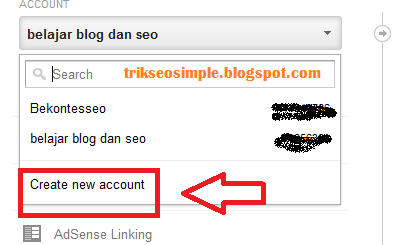
  • kemudian cari ACCOUNT dan klik atanda panah kecil dibawahnya.
add new website on google analytics


  • Setelah itu pilih CREATE NEW ACCOUNT dan ikuti langkah-langkahnya seprti ketika anda pertama mendaftar google analytics disini.

klick create  account

Yang harus di ingat adalah ketika anda memsang kode tracker GA di blog anda mungkin sedikit susah, silahkan pakai kode yang sudah saya berikan di postingan cara daftar Google analytics.


oke sekian tips dari saya


wassalamualaikum wr. wb